- Key Takeaways
- Why Event Videos Need A Clear Story
- Step One: Define The Video’s Main Job
- Step Two: Build A One-Page Story Brief
- Step Three: Plan The Right Moments To Capture
- Essential Footage Categories
- Step Four: Prepare Better Interviews And Audio
- Step Five: Plan For Multiple Video Formats
- Step Six: Make The Video Easy To Follow
- Step Seven: Use A Practical Production Timeline
- Four To Six Weeks Before
- One To Two Weeks Before
- On Event Day And After
- Common Mistakes To Avoid
- How To Measure Whether The Video Worked
- People-First Content Checks
Key Takeaways
-
A strong event video begins with a clear story, not an equipment checklist.
-
The most useful coverage includes people, reactions, preparation, action, and atmosphere.
-
Interview questions and audio planning should happen before event day.
-
One shoot can support recaps, social clips, speaker edits, and testimonials.
-
Captions, readable graphics, and clear sound make video easier to follow.
-
Success depends on the original goal, not views alone.
From Charlotte conferences and Raleigh fundraisers to Wilmington celebrations and mountain retreats, a successful event video needs more than attractive shots. It needs a reason for people to watch after the room has emptied. Planning around a story helps footage feel purposeful, whether the event is professional, personal, public, or private.
Teams looking for video production services in North Carolina can get more value from a project by deciding what the video should accomplish before cameras arrive. A clear creative direction helps capture the people, details, reactions, and messages that make an occasion worth revisiting.
Why Event Videos Need A Clear Story
Beautiful venue footage can still feel flat if viewers do not understand why the event matters. A story gives the edit direction. It answers what people expected, what happened during the gathering, and what changed, connected, or became memorable as a result.
That structure works for a corporate summit in the Triangle, a nonprofit gala in Greensboro, a wedding in Asheville, or a local product launch. The scale changes, but the human question remains the same: why should someone care about this moment?
Step One: Define The Video’s Main Job
Before making a shot list, identify the job of the finished video. It may need to encourage next year’s registrations, preserve a family milestone, share a speaker’s lesson, thank sponsors, or show prospective attendees what the experience was like.
-
Who is most likely to watch this video?
-
What should they remember, feel, or understand?
-
Where will they see it: on a website, in an email, on a social channel, in a presentation, or in a private gallery?
-
What action, if any, should they take afterward?
Step Two: Build A One-Page Story Brief
A compact brief keeps planners, speakers, camera operators, and editors aligned. It should name the event purpose, primary audience, central message, important people, must-have moments, and intended deliverables.
For example, a North Carolina community fundraiser may center on the idea that local support creates practical change. That message can guide every filming choice, from interviews with organizers to footage of volunteers greeting guests and attendees responding to the program.
Step Three: Plan The Right Moments To Capture
Do not limit the plan to stage presentations and posed group photos. Those moments are useful, but they rarely tell the whole story on their own.
Essential Footage Categories
-
Setting: Exterior arrival shots, signage, room details, décor, and crowd flow.
-
Preparation: Setup, rehearsals, sound checks, deliveries, and quiet pre-event activity.
-
People: Guests arriving, hosts preparing, families greeting, and staff solving problems.
-
Action: Talks, ceremonies, performances, demonstrations, and conversations.
-
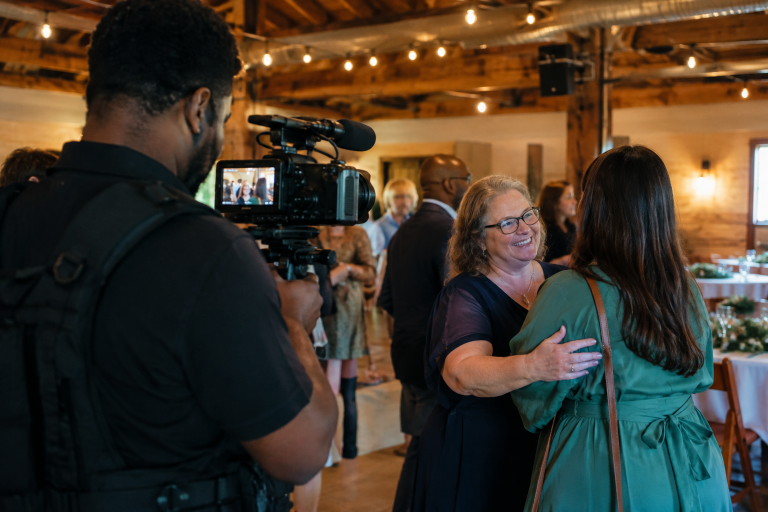
Reaction: Applause, laughter, concentration, hugs, and spontaneous exchanges.
-
Transitions: Natural movement through hallways, entrances, outdoor spaces, and room changes.
Reaction footage often becomes the emotional center of an edit. A formal speech can explain an event’s purpose, while a guest’s expression can show why that purpose landed.
Step Four: Prepare Better Interviews And Audio
Short interviews add meaning when they sound natural. Ask open questions such as, “What made this worth attending?”, “What stood out today?”, and “What would you tell someone who missed it?” Encourage people to answer in complete thoughts, so their clips make sense without the interviewer’s question.
Audio deserves equal attention. Record interviews away from loud HVAC systems, busy catering stations, live music, and hard-surfaced spaces with heavy echo. Capture room tone, applause, footsteps, laughter, and other natural sounds as well. Clean dialogue and intentional ambient sound make edits feel connected rather than patched together.
Step Five: Plan For Multiple Video Formats
Decide on the deliverables before filming, especially if the footage must work in both horizontal and vertical layouts. A single North Carolina event may produce a full recap for a website, a fast highlight reel for social media, speaker clips, behind-the-scenes moments, sponsor thank-yous, and guest testimonials.
Vertical clips need close framing, concise openings, and safe space for captions. Longer recaps need clearer structure. For videos with multiple sessions or distinct segments, chapters can divide a video into sections, allowing viewers to return to the speakers or moments that matter most to them.
Step Six: Make The Video Easy To Follow
-
Add accurate captions for spoken material.
-
Use readable text with strong contrast against the background.
-
Keep on-screen graphics short and away from the edges of vertical video.
-
Identify speakers when viewers may not know them.
-
Keep the music below the dialogue so the words remain understandable.
-
Review names, titles, dates, and sponsor references before publication.
Step Seven: Use A Practical Production Timeline
Four To Six Weeks Before
Set the audience and purpose, review the schedule, identify key people, confirm venue access, and discuss filming permissions, music, and any restrictions.
One To Two Weeks Before
Finalize the shot list, prepare interview prompts, visit the location if possible, check lighting and sound conditions, and make backup plans for weather or schedule changes.
On Event Day And After
Film the venue before guests arrive, capture arrivals and reactions throughout the day, record interviews while memories are fresh, and back up footage before leaving. Afterward, organize clips by person and scene, mark strong quotes, build the story before adding effects, and export each version for its intended platform.
Common Mistakes To Avoid
-
Filming large amounts of footage without a defined purpose.
-
Ignoring audio until the edit begins.
-
Capturing only the stage and missing the audience experience.
-
Skipping a location walk-through.
-
Making every social clip too long.
-
Forgetting appearance, venue, or music permissions.
-
Using transitions and effects that distract from the story.
How To Measure Whether The Video Worked
Match measurement to the goal. A conference recap may be evaluated through registrations, sponsor feedback, internal sharing, watch time, or reusable clips. A wedding film may have no public engagement at all and still be deeply valuable. Review completion rates for short videos, comments and replies, attendance connected to the campaign, and how many useful assets came from the original shoot.
People-First Content Checks
Before publishing, ask whether the video addresses a real audience need, provides an original perspective, uses accurate names and claims, and communicates without filler. People-first content should provide a satisfying experience, a useful standard for both event videos and written content.
A memorable event video does not simply document who stood on stage. It preserves the purpose, energy, and real connections behind the occasion. With a focused brief, thoughtful interviews, clean audio, flexible framing, and room for unscripted moments, a single North Carolina event can yield useful content long after the big day.